Spun Intelligence Layer
Thousands of messages in. One answer, always current.
Your WhatsApp holds the answers - buried in ten thousand messages. Spun lets you pin a standing question to any chat or group and keeps it answered as messages arrive, with every claim linked to the messages behind it. Read it in the app, in your daily summary, on your MCP Dashboard, or through your connected AI.
Now live
Chat digests, the MCP Dashboard and daily-summary digests are live in the Spun app. The MCP digest tools marked "coming" are the next addition to the hosted tool surface.
How it works
Ask once. Stay answered.
A digest is a standing question over one chat, several, or a whole group - "what did we agree with this supplier?", "which complaints are still open?". Spun folds new messages into the answer as they arrive; you never re-ask.
1 · Define the question
Pick a chat or group, type the question, choose the answer language and how often it refreshes. You see a cost estimate before the digest exists.
2 · Spun keeps it answered
New messages fold into the answer incrementally. Periodic full rebuilds re-read the window from scratch, so stale conclusions get replaced instead of accumulating.
3 · Read it instantly
Opening a digest serves the prepared answer - no waiting on a model, no surprise cost. Refreshing early is always an explicit, visible action.
Speed
Prepared beats on-demand
The fastest AI answer is the one that was ready before you asked. That is the whole architecture of this layer.
Instant by design
Digests, cards and summaries are prepared ahead of time - opening one is a database read, not a model run. No spinner, no thirty seconds of "thinking".
Millisecond history reads
Answers and their evidence resolve against your org’s indexed history - full depth, millisecond-scale, even while the WhatsApp number is offline.
Faster agents, fewer calls
An AI reading a prepared answer spends one tool call where a raw-API agent paginates through hundreds of messages - quicker replies, smaller token bills.
Chat digests
Standing questions, evidence-backed answers
As many questions as you like per chat or group. Answers update incrementally - only new messages spend tokens - and rebuild from scratch periodically so the answer never drifts from the conversation.
Many questions per chat
One supplier group can carry "open commitments", "price changes" and "delivery issues" side by side - each digest tracks its own question, on its own schedule.
Rolling, not re-run
Each refresh folds only the new messages into the standing answer, so a busy chat stays affordable. Scheduled grounding rebuilds re-derive the answer from the raw messages.
"Why did Spun say this?"
Every claim in an answer cites the source messages behind it. Tap a citation to see the original message - the answer is checkable, not just plausible.
Coverage, stated honestly
Each answer says what it looked at: "412 messages analyzed, 9 cited". You always know how much of the conversation stands behind what you are reading.
Your language, your phrasing
Answers are written in the language you choose per question - run an English operation over Hebrew chats, or the reverse.
Screened before stored
Customer messages are untrusted input. Answers are screened before they are stored, fabricated citations are dropped, and periodic rebuilds purge anything that should not have survived.
Daily summary
Now liveYour digests, in your morning recap
Spun already sends a daily summary of what happened across your inbox. Mark any digest "include in daily summary" and its current answer arrives as a section of that recap - your standing questions, answered every morning, in the channel you already read.
The MCP Dashboard
Now liveSave your common requests. Load them instantly.
The requests you keep making through MCP - "what did we agree?", "who is waiting on us?" - become standing cards on the MCP Dashboard: digests, group-intelligence signals, AI-send approvals, follow-ups and due tasks. MCP manages the intelligence; the dashboard serves it. Opening a card is instant, with no model call and no MCP round-trip, because the answer was prepared before you arrived.
Configurable cards
Digests, group-intelligence signals, AI-send approvals waiting on a human, follow-ups, and tasks due - toggle, reorder, add and remove per user.
An attention strip
The top of the page answers one question: what needs a person right now - pending approvals, high-urgency signals, overdue follow-ups.
Staleness, honestly
Every card states how fresh its intelligence is - fresh, aging or deep-stale - and a rebuilding digest says so. The dashboard never presents old intelligence as current.
Zero-AI-latency loads
Opening the dashboard never triggers a model call. Everything on screen was prepared ahead of time; refreshing a digest is always your explicit action, with its cost shown.
Org default layouts
A manager saves the team default; new members start from it, and anyone can customize or reset back to it.
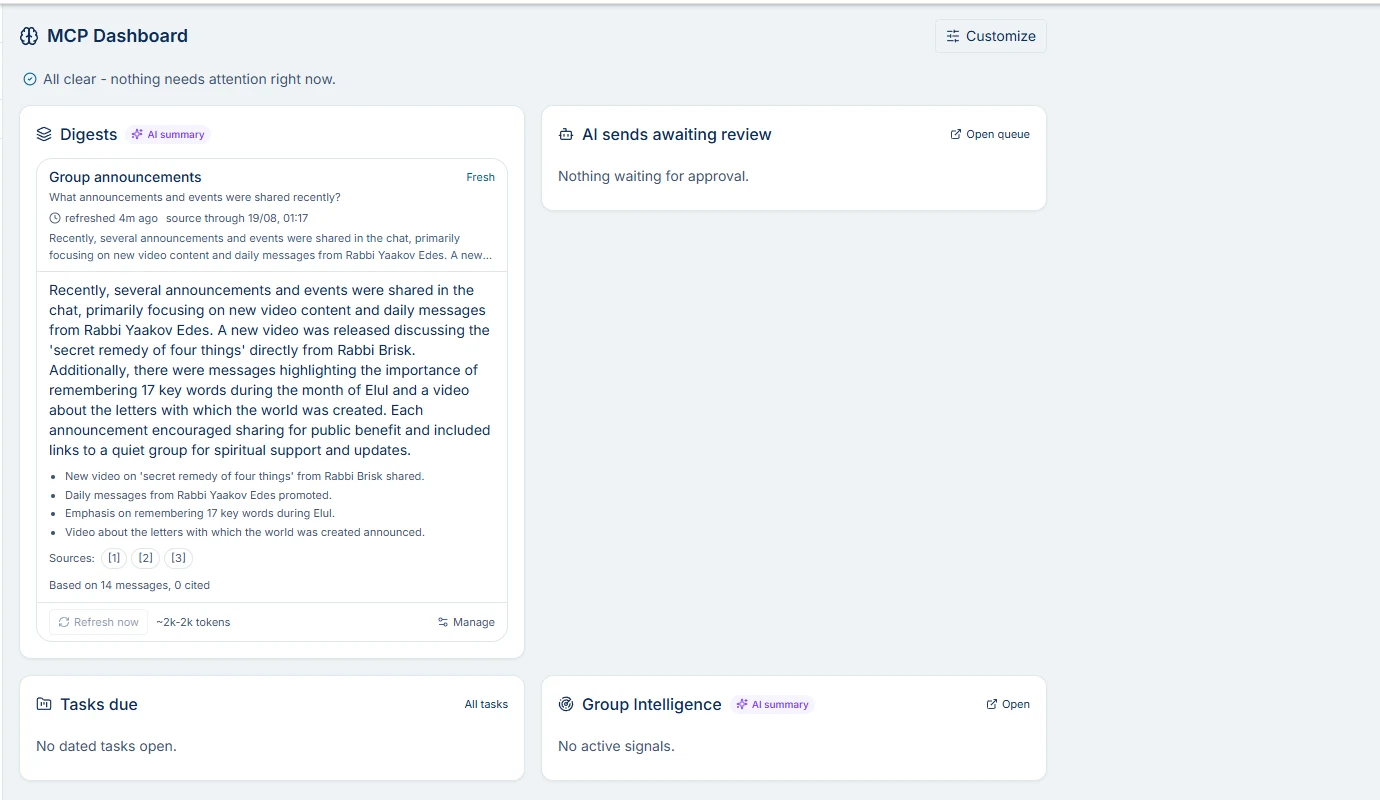
The MCP Dashboard in the Spun inbox - a real screenshot, digest answer included.
A manager sets the team default layout; every user can customize their own on top of it.
Managed through MCP. Read without it.
The two surfaces are one system: your AI curates the intelligence, the dashboard serves it prepared. Here is what you can do from each side:
From your AI, over MCP
Digest tools coming- Pin a new standing question to any chat or group
define_chat_summarycoming - Read any prepared answer instantly
get_chat_summarycoming - Investigate around an answer with the live tool set: history search, the follow-up queue, contacts and campaigns
- Draft the follow-up a digest calls for - straight into the approval queue
From the MCP Dashboard, in the Spun inbox
- Create, edit, pause, refresh or rebuild any digest - and roll back to an earlier version
- See the cost estimate before a question exists, and actual spend against it while it runs
- Toggle, reorder, add and remove cards; managers save the team default layout
- Approve or reject pending AI sends, and open the evidence behind any claim
Built-in integrations
One dashboard, every system you already run
The MCP Dashboard is not another silo - each card is a window into a Spun system that already works for you:
Group Intelligence
Urgent group signals surface as their own card, next to your digests.
Daily summary
Digests opt into the recap you already receive every morning.
AI-send approvals
The approval queue is a card: clear text sends approve in two taps, everything else links through.
Follow-up queue
Oldest unanswered and waiting-on-you conversations, surfaced beside the intelligence.
Tasks & projects
Your open dated tasks, overdue first, on the same screen.
Team share access
Limited members and partners see only the cards their scope allows.
In-app assistant
Spun’s built-in assistant reads your digests when you ask it questions.
MCP clients
claude.ai, Cursor and any MCP client - digest tools joining the hosted surface.
comingSharing
Show clients the intelligence, not the inbox
Digest answers are shareable through the same scoped access your team inbox already uses. A client or partner with limited access sees a digest only when every chat feeding it is inside their scope - Spun withholds the whole answer rather than serving a partially redacted one.
Viewers read prepared answers. Viewing a digest never runs AI work and never spends your AI budget.
Cost transparency
Know the price before you ask the question
AI you cannot budget for is AI you turn off. Every digest shows its cost before it exists and reports what it actually used while it runs.
An estimate before you create
Creating a question shows a token range per refresh and per month, computed from the chat’s recent activity. The estimate follows current activity - if the chat gets busier, use rises accordingly, and the UI says exactly that.
Actuals, tracked against it
Every digest records what it actually spends. A digest running well past its estimate gets a visible overrun notice - not a silent bill.
Auto-pause guards
A per-org digest budget slows refreshes as it tightens and stops them at the cap. Digests nobody reads pause themselves before spending more - and say so when you come back.
From reading to responding
Intelligence that ends in an approved message
A digest tells you a customer is waiting on a quote. The next step should not be scrolling. Ask the assistant to act, and the loop stays governed the whole way:
1 · Read the summary
The digest surfaces the situation: who is waiting, on what, since when.
2 · Pull the evidence
Citations open the exact source messages, so you or your AI verify before acting.
3 · AI drafts the reply
The assistant prepares the message with the sending channel and its stated reason attached.
4 · A human approves
The draft waits in the approval queue until a teammate approves - then the server sends it.
The draft lands in the AI-sends approval queue with the real channel, recipient and content. Nothing sends until a human with send permission approves it - the same send flow that governs every AI send in Spun.
MCP + API access
Coming to the MCP surfaceYour connected AI reads the same layer
Everything on this page is data your assistant can work with. Connected AI apps - claude.ai, Claude Code, Cursor or any MCP client - reach your Spun workspace through the Spun MCP server today, and dedicated digest tools are next on that surface:
| get_chat_summary | Read the current answer of a digest - the prepared, evidence-linked summary, served instantly. |
| define_chat_summary | Create a standing question on a chat, within the same scope, budget and approval rules as everything else. |
Planned tool names on the MCP surface; the same capabilities power the in-app assistant. Until they ship externally, digests live in the Spun app - your MCP-connected AI keeps its existing 75 tools.
Governance
Intelligence you can hand to an AI - safely
The reason this layer exists at all is that it is governed end to end. That is the differentiator, and it is structural, not a promise:
Human approval on every send
Intelligence can end in action, but the action passes the AI-sends approval queue. By default nothing reaches a customer without a person approving the actual content.
Read scope is org policy
Digests see only what your org’s AI read scope allows - the channel allowlist, label rules and the group toggle apply to standing questions exactly as they do to every other AI read.
Scope is re-checked on every read
If a chat leaves a viewer’s scope, the answer built on it is withheld from them on the very next read - not on the next refresh.
Injection-resistant by construction
Customer text is labeled untrusted before any model reads it. Digest answers are screened before storage, citations are validated against the messages actually read, and grounding rebuilds purge residue.
FAQ
Spun intelligence layer - frequently asked questions
Stop re-reading. Start asking.
Pin your first standing question to the busiest chat you have - and let the answer stay current on its own.
Get started